EPLANT-Piping V 2023.0
Mayor changes in the last 14 versions
Listed below are the most important changes of the current version 2023.0
with respect to the 2009.0 one and between. Current version is compatible with AutoCADŽ from version
2004 up to 2024, both 32 and 64 bits. It is also compatible with ZWCAD from version
2020 up to 2024.
It contains the following changes with respect to the 2022.0 version:
- AutoCAD 2024. This EPLANT-Piping version is compatible with the current
AutoCAD 2024 version.
- ZWCAD 2024. This EPLANT-Piping version is compatible with the current ZWCAD 2024 version.
It contains the following changes with respect to the 2021.0 version:
- AutoCAD 2023. This EPLANT-Piping version is compatible with the current
AutoCAD 2023 version.
- ZWCAD 2023. This EPLANT-Piping version is compatible with the current ZWCAD 2023 version.
It contains the following changes with respect to the 2020.0 version:
- AutoCAD 2022. This EPLANT-Piping version is compatible with the current
AutoCAD 2022 version.
- ZWCAD 2022. This EPLANT-Piping version is compatible with the current ZWCAD 2022 version.
It contains the following changes with respect to the 2019.0 version:
- AutoCAD 2021. This EPLANT-Piping version is compatible with the current
AutoCAD 2021 version.
- ZWCAD 2021. This EPLANT-Piping version is compatible with the current ZWCAD 2021 version.
It contains the following changes with respect to the 2018.0 version:
- AutoCAD 2020. This EPLANT-Piping version is compatible with the current
AutoCAD 2020 version.
- ZWCAD 2019 SP1 and ZWCAD 2020. This EPLANT-Piping version is compatible with both
ZWCAD 2019 SP1 and ZWCAD 2020 versions. ZWCAD+ 2012, ZWCAD+ 2014 SP1 are no longer supported.
It contains the following changes with respect to the 2017.0 version:
- AutoCAD 2019. This EPLANT-Piping version is compatible with the current
AutoCAD 2019 version.
- ZWCAD 2018. This EPLANT-Piping version is compatible with the current
ZWCAD 2018 SP2 version.
It contains the following changes with respect to the 2016.0 version:
- AutoCAD 2017 and 2018. This EPLANT-Piping version is compatible with both the latests
AutoCAD 2017 and 2018 versions.
It contains the following changes with respect to the 2015.0 version:
- EPLANT Web License Manager V3.1 New enhanced version:
the user can directly Activate and Move the Web License.
- 3D Insulation New command to generate a 3D representation of piping component Insulation.
- Pipe to Pipe Pipes can accept new connection points outside the central axis to allow
connecting off axis branch pipes.
- Lineweight Lineweight settings are available now for all isometric and 2D plans layers.
It contains the following changes with respect to the 2014.0 version:
- New Web License Schema This licenses are now compatible with any CAD version supported
by EPLANT-Piping.
- AutoCAD 2016. This EPLANT-Piping version is compatible with the latest AutoCAD 2016 version.
- ZWCAD+ 2015 SP2.1. This EPLANT-Piping version is compatible with the latest ZWCAD+2015
version.
- 2D Plan Generation. This command has been enhanced and produces now flat projections.
It is compatible with any EPLANT-Piping and EPLANT-STH primitive solids and also with any 3DSOLID,
LINE, CIRCLE, ARC and LWPOLYLINE created with the CAD or included in EPLANT component definition.
View orientation is now defined by the orientation of the viewport associated to each view and not
as before by the orientation of the prism associated to the view that is only used now as
spatial filter.
- Free License. From this version on, the data base module will not require a license
to work. That means that also the limited Evaluation Version will be able to
use it without any limitation.
It contains the following changes with respect to the 2013.0 version:
- EPLANT Client. The EPLANT Client has now
a new option which allows to locally set the License Type. This allows to mix different License Types
in the same net installation.
- ZWCAD+ 2014. This EPLANT-Piping version is compatible
with the latest version of ZWCAD+ 2014 SP1.
- EPLANT TRAINING PLATAFORM
A new trainig option is made available online without charge. It is based on high quality structured
commented videos. It allows to attain a high quality autonomous training.
Tutorials and videos are also available directly from the Help dialog boxes in most of the commands.
It contains the following changes with respect to the 2012.0 version:
- EPLANT Web License Manager This manager is used to Activate
the Web Leasing Licenses that is a new License schema now available. Internet connection is required.
Leasing time can be for one month (free Web License for testing) or one year (Production
License).
- Polyline Pipes A Pipe segment can now be automatically
created selecting an Open 2D or 3D Polyline. No restrictions apply on its shape. The Polyline must
be placed in the Line Route Layer of the corresponding Piping Line. This components are
considered as any other pipe (or tubing) component with its length equal to the
polyline length. Look in the main menu: PD_1 / Pipes / Pipe on Polyline.
- Automatic Web Version Checking. Available in the graphic module as well.
- Import Setup from another Project. This new command allows to import the setup
from an existing project to the currently open one. The existing project must be of the
same version as the installed one.
It contains the following changes with respect to the 2011.0 version:
- ZWCAD+ 2012. This EPLANT-Piping version is compatible
with the latest version of ZWCAD+ 2012.
- AutoCADŽ 2013. This EPLANT-Piping version is compatible with the latest 2013 version
of AutoCADŽ both 32 and 64 bits. Sentinel Hardlocks are not supported for AutoCAD 2013 64 bits.
- MDI Aware EPLANT-Piping is now Multiple Design Interface
Aware: more than one drawing file (of the same project) can be opened in the same AutoCAD or ZWCAD
session.
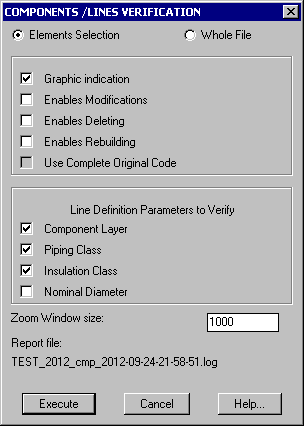
- Piping Lines Verification It is new command, similar to the Piping Class Verification
one, to verify Piping Components against the corresponding Line Definition, with respect to
Piping Class, Insulation Class, Nominal Diameter and Layer.
- Tag Edit During the placement of a piping component having Tag, the command allows
to check the EPLANT_P&ID to import all Tag values corresponding to the line being constructed.
A special Tag button with the same functionality is found now
in the Component Name command.
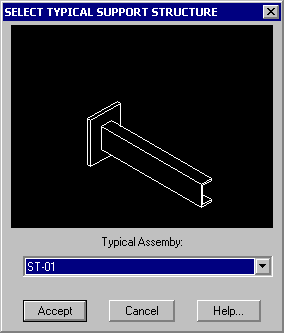
- Support Structure A new feature allows to create 3D typical models for Support Structures,
place them in the 3D model, link them to the corresponding piping supports and automatically
generate 2D plans for each support structure.
- Log File During Isometric Extractions, PCF File Export, Naviswork Export and
Include 3D Model a Log file can be generated to store all command line messages.
- Insulation The isometric MTO will generate Insulation material if the corresponding
piping component is insulated.
- System Setup. New option to enable automatic checking of the latest available
version to download. Available in Tolerances option.
- New PID field in COD.DBF. This new field allows to map each piping component against
the corresponding object class in EPLANT-P&ID symbols. Used to check between EPLANT-Piping objects
and the corresponding ones in EPLANT-P&ID.
- Insulation Specifications. Insulation Specifications have now new fields to
specify Material and Additional Code, both for the insulation and the Lining, if any.
Insulation is generated in the main project material table and not in Requisitions alone as before.
It is possible to generate it in the isometric MTO also.
Changes with respect to the 2010.0 version:
- AutoCADŽ 2012. Compatible with the latest 2012 version
of AutoCADŽ both 32 and 64 bits.
- Branch Tables Selecting the new menu option:
PD_1 / Branch / Branch Table, the selection
of the component that will be placed in a branch connection is automatically driven by the
Branch Table corresponding to the Piping Specification in use. If the mandatory checking of the
Branch Tabes is enabled, only allowed components can be placed, also manually. A sequence of more than
one component and more than one option can be specified for a given diameter combination.
- Pipe to Pipe In Pipe to Pipe connection, both the first and the second end can be
conected to another pipe as branch. The branch table is also supported.
- Parametric Definition Files (PDL) Reading
Dimensional Tables has been simplified due
to a Format change in Dimensional Tables. The search key is automatically built based
on the DBF file structure, with no need of an explicit declaration in the PDL file. The same
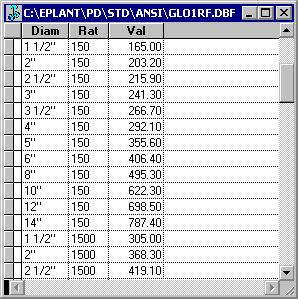
pdl file can be used by different components. As an example, the dimension table defining
face to face dimension of a RF flanged Globe Valve for the ANSI standard looks like:
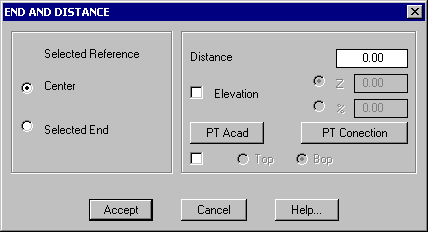
- End and Distance Both the reference and the selected point on axis are now correctly
shown using a cross drawn over the screen. It is now possible to set a vertical displacement
or slope also.
- Dialog Boxes Memory Windows used as dialog boxes during component placement remember
their last position when called again.
Changes with respect to the 2009.0 version:
- AutoCADŽ 2011. Compatible with the latest 2011 version
of AutoCADŽ both 32 and 64 bits. It is also compatible with AutoCADŽ 2010 64 bits.
- PCF Export. New command to export piping lines
to PCF format, compatible with Isogen.
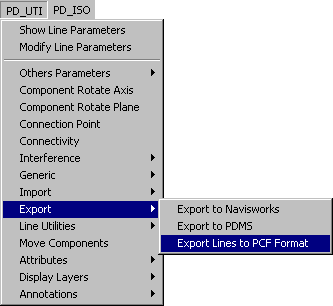
- Navisworks Export. It generates now Internal / External / Alternate Material Codes
if these options are enabled in the project setup.
August 02, 2023.